
To be honest, I used to think that dealing with electricity bills was an unavoidable hassle. You know: forgetting the due date, then having to go to an office, standing in long queues… the whole process was such a pain. But then, a reader shared their experience with me, and it completely changed my perspective.
They told me how they forgot their bill due date and were worried about how they would settle it. When they finally logged into the KPLC Self Service platform, they expected the worst. But to their surprise, the platform was not confusing at all. It was incredibly simple! They immediately paid their payment after checking it, and they even set a reminder for the next month so they wouldn’t forget.
Their message clearly conveyed their relief.Sometimes, I reasoned, we just need to take a moment to look around for ideas that will make our lives simpler. I made this tutorial with it in mind. I want to familiarize you with every feature of the KPLC Self Service portal, so you can avoid that same hassle.
What Exactly is KPLC Self Service?
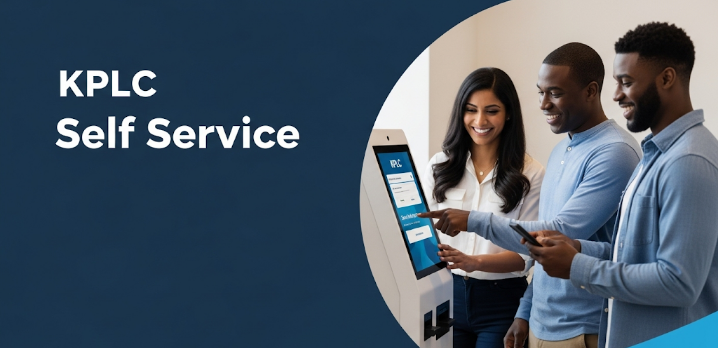
Simply put, KPLC Self Service is a digital service from Kenya Power that gives you control over your electricity account. It’s a combination of an online portal and a USSD service that eliminates all the middlemen.
Remember those days of paperwork, long queues in the sun, and frustrating calls to customer service? Well, those days are over. With KPLC Self Service, you can manage almost everything related to your power account from the comfort of your home or office, 24/7. It’s all about saving you time, money, and a whole lot of stress. Whether you are a prepaid or postpaid customer, this platform has been designed specifically for you. It gives you back control, directly in your hands.
KPLC Self Service Key Features: What Can You Actually Do?
Here’s where the magic takes place. There are many very helpful features on this site, so it’s not just for show. Let’s examine each of them separately.
1. Check Your Bill (Bill Inquiry):
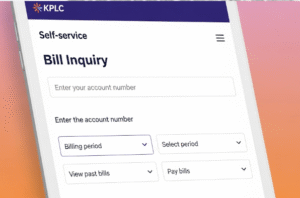
This was the feature that impressed my readers the most. If you’re a postpaid customer, you can check your outstanding balance in seconds. No more phoning to ask questions & waiting for the paper bill. To find out precisely how much you owe & when it is due, simply log in to the portal & then enter *977#. The first step in assuming power is this transparency.
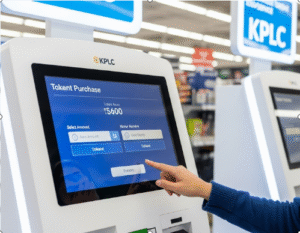
2. Buy Prepaid Tokens Instantly: For my prepaid friends, this is probably the most used feature. Gone are the days when you had to rush to an agent at 10 PM to buy tokens, only to find they were out of stock. Now, you can buy tokens anytime, day or night. The procedure is quite easy: choose the amount, pay using Airtel Money or M-Pesa, and the tokens will be sent to your phone by SMS. It is really handy, dependable, and quick.
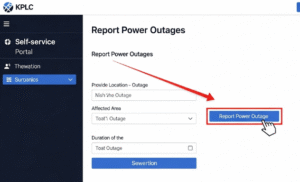
3. Report Power Outages Directly: This feature is invaluable. When the power goes out, the last thing you want to do is wait on hold with customer service. With this platform, you can report outages yourself in just a few clicks. Even better, the system often provides an estimated time of restoration. This direct communication saves you a lot of frustration.
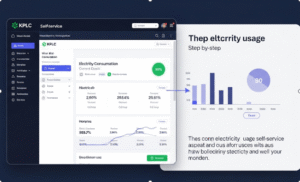
4. Monitor Your Electricity Consumption: I mean, knowledge is power. You may view your daily, weekly, and monthly power use using this function. You may view the number of units you’ve used and the associated bill amount. It’s quite helpful for budgeting and figuring out which gadgets are consuming excessive amounts of electricity. By understanding your consumption, you can actively reduce your bill.
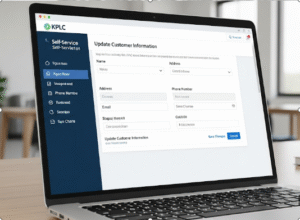
5. Update Customer Information: Moved to a new address? Changed your phone number? To ensure you don’t miss any crucial messages, KPLC must have your accurate information. You may use this gateway to update your information immediately rather than going to a branch. It’s a minor detail that has a significant impact.
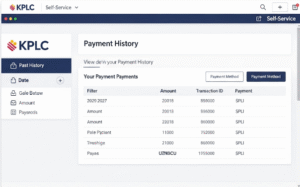
6. View Your Full Payment History: Whether you need payment records for your business accounts or maintain personal records, this portal acts like a digital filing cabinet. Your payment history and previous bills are always accessible. Ideal for keeping track of spending or resolving any misunderstandings.
How to Access the KPLC Self Service Portal?
Let’s examine how to access it before delving into its incredible capabilities. Regardless of whether you have a smartphone or a basic feature phone, Kenya Power has made it available to everyone.
- Official Website: For the full experience, visit selfservice.kplc.co.ke on any web browser on your computer, laptop, or phone.
- MyPower Mobile App: If you’re always on your phone, this is for you. Get the official “MyPower” app from the Apple App Store (for iPhones) * on Google Play Store (for Android phones). This app is mobile-friendly, quick & streamlined.
- USSD Code (*977#): This is a real game-changer for millions of Kenyans. You don’t even need internet data or a smartphone. Just call *977# from your Airtel or Safaricom line, and a menu with all of the options will show up on your screen. It’s excellent and remarkably easy.
How to Register for KPLC Self Service: A Step-by-Step Guide
I know that sometimes this “easy” registration process can seem a bit tricky, so I have broken it down into clear steps. Registering through the website is the easiest way.
What You Need First:
- Your KPLC account number.
- Your meter number.
- Your ID number.
- A valid phone number and email address.
Registration Steps:
1. Go to the Portal: Open your browser and go to selfservice.kplc.co.ke.
2. Click “Register”: This button will be clearly visible on the login page. Click it to get started.
3. Enter Your Details: Fill in all the required information accurately – your account number, ID number, meter number or phone number. Check again to be sure there are no mistakes !
4. Verification: You will receive a verification code at the phone number and email address you supplied. This is to verify your identity.
5. Activate Your Account: Go to the portal and enter the code you were given. Your account will be activated as soon as the code is approved.
6. Set a Password: For next logins, you will be required to generate a secure password.
7. Done! Your Account is Created: That is it! Now you can log in * then explore all the features.
Those that utilize the USSD code (*977#) find the process much simpler. Simply call the code and adhere to the instructions. It will guide you through a similar verification process using your details.
Key Benefits of Using KPLC Self Service
Why switch? Let me tell you:
- Convenience: The largest benefit is this. You may access your account from anywhere at any time. Pay your bill at midnight? Buy tokens while on a trip? Absolutely!
- Conserves Time: Long lines and travel times are over. It takes minutes now instead of hours.
- Transparency: You get instant access to all of your data, including use, history and invoices. No more guesswork.
- Control: You can use & spend power wisely if you have all the details you need at your fingertips.
- Reliability: You are not limited by holidays or business hours because this service is available around-the-clock.
Understanding the Benefits & Drawbacks
Let’s examine all viewpoints in order to be really objective.
Benefits (positive aspects):
- Complete convenience & availability around-the-clock.
- Save time and money on travel.
- Complete transparency and control over your account.
- Easy to use on multiple platforms – website, app, USSD.
Drawbacks (Cons):
- Requires an internet connection for the website/app, and a mobile phone for USSD.
- Any digital system may occasionally be down for maintenance.
- The first registration process may seem a little complicated to those who are not accustomed with internet forms.
Common Problems and Their Solutions
Since no system is flawless, you may run into some problems. Here’s what to do in the event that something goes wrong:
- Problem: Tokens Arrive Late
You paid, but the tokens haven’t arrived.
Solution: Do not panic. First, verify that the payment was taken out by looking at your M-Pesa or Airtel Money message. The system occasionally has a small lag. Contact KPLC customer service right away if it takes longer than ten to fifteen minutes. Always keep your transaction message as proof of payment. - Problem: Not able to access your account
Solution: First, reset your password using the “Forgot Password” option, then please confirm that you are using the correct ID & account number when logging in if it does not work. The system’s exceptional sensitivity allows it to detect even minor errors. - Problem: System Unavailable
Solution: normally, this happens during planned maintenance, which normally happens at night. Please give it another go later. For notifications of system outages, you can also visit KPLC’s official social media accounts, such as Twitter.
Above all, please have your account number, meter number, and transaction codes on hand when you call assistance. This will enable us to address the problem more rapidly.
Embrace the Future with KPLC Self Service
The KPLC Self Service site is a huge advancement for all of us in Kenya, bro. It is much more than simply a digital tool. It is about adopting technology that genuinely makes our life easier. It gives you back control over your electricity and your valuable time.
In addition to making your life easier, you are also contributing to the development of a more modern & effective energy system for everybody by utilizing this digital solution. Therefore, the next time you need to check your balance, pay your bill, & get a token, skip the queues & use the app right immediately. Try it out!
Remain educated, maintain your authority & assume responsibility.
FAQS
KPLC Self Service: What is it?
Customers may conveniently manage their power accounts via Kenya Power’s online and mobile interface.
How can my KPLC bill be viewed online?
You can either enter the KPLC Self Service portal or enter *977# on your phone.
Can I use KPLC Self Service to purchase prepaid tokens?
Indeed! Tokens may be purchased online or by using the USSD code, and payments can be made with M-Pesa or Airtel Money.
How may a power outage be reported?
To report an outage and receive updates, use *977# or the Self Service portal.
Does using KPLC Self Service require an internet connection?
Not all the time. To access services without internet, call *977#.
How can I sign up for Self-Service at KPLC?
Go to selfservice.kplc.co.ke, click Register, and then proceed as instructed.
Does KPLC Self Service have an app?
Indeed. On your smartphone, you may download the MyPower app.
Can I use Self Service to update my contact information?
Of course! You may change your email address or phone number at any time.
How do I proceed if I don’t get my token?
Verify your payment confirmation, then give KPLC the specifics of your transaction.
Is KPLC Self Service open around-the-clock?
Indeed! It is available to you day or night.